English Grammar - AI Tutor
- 4.6
- Rating
- 1.00M
- Installs
- Free
- Price
 Analysis by App-foxy
English Grammar - AI Tutor is the kind of education app I would suggest to someone who knows enough English to communicate but keeps losing confidence over grammar. It focuses on lessons, practice tests, and AI-based corrections rather than trying to become an all-purpose language course. After using it, my main impression is clear: it works best as a practical grammar companion, not as a complete replacement for a teacher or a full English-learning program.
The app is free to install and is suitable for Everyone, which makes it easy to try without a large commitment. It comes from VietDevPro and has already passed the one-million-install mark, with a 4.6 average from roughly forty-five thousand ratings. Those figures suggest that the app has found a real audience, but they do not remove the need to look at how it fits into everyday study. Grammar apps can be useful in very different ways: some are designed for quick drills, some explain rules deeply, and others mainly correct writing. This one sits between those uses.
What makes the learning approach useful
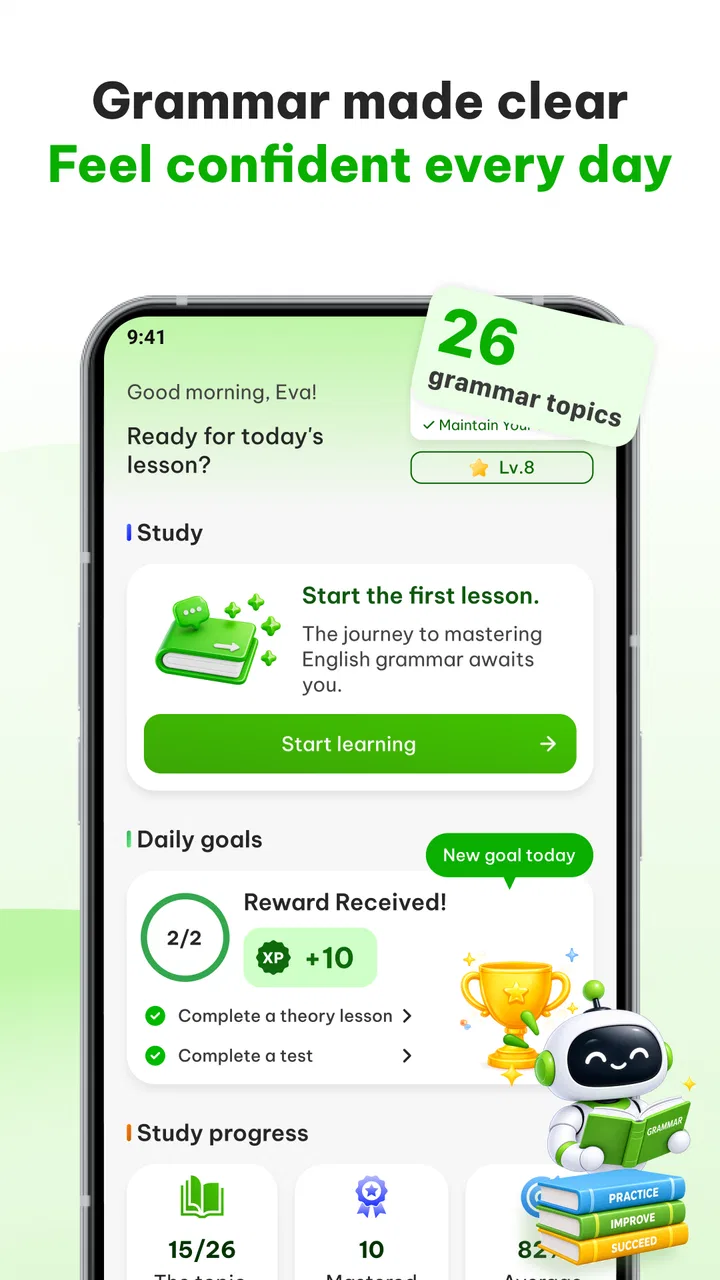
The strongest part of English Grammar - AI Tutor is the combination of explanation, testing, and correction. Many grammar apps give you multiple-choice questions and tell you whether you were right. That is convenient, but it can leave you guessing about the reason behind an answer. Here, the lesson material gives you a chance to review the rule before moving into practice, while the correction element is more helpful when you want to examine your own sentences.
You May Also Like

 Blood Strike: 2.5 Anniversary
Blood Strike’s Loadouts Turn Every Drop Into a Tactical Gamble
A close look at Blood Strike’s custom loadouts: how fast access to signature weapons reshapes its battle royale rhythm, rewards preparation, and narrows the gap between fights.

 Pandora - Music & Podcasts
Pandora’s Music Is Easy to Start, but Harder to Recover
Pandora’s strength is its low-effort path from a seed to a station. Its weak spot is how much confidence it asks you to place in connection, setup, and quiet recovery.

 8 Ball Pool
 Is Built on Rivalries, Rematches, and Routine
A close look at the rivalries, rematches, shared routines, and unanswered safety questions that turn a quick pool match into a persistent mobile community.

 Samsung Music
’s Quiet Strength Is Playing What You Already Own
Its reach comes less from spectacle than from dependable access to a personal library. That simplicity is both the app’s strongest retention engine and its ceiling.

 AccuWeather: Weather Radar
AccuWeather Review: A Quick, Clear Forecast for Everyday Decisions
For everyday plans, the best forecast is the one you can understand quickly. AccuWeather makes rain timing, radar, and local conditions easy to act on, with a few trade-offs.

 Hill Climb Racing
Why Hill Climb Racing Still Turns Crashes Into One More Run
A tiny car, a bumpy hill and one more upgrade: Hill Climb Racing keeps resurfacing because its simple chaos makes every near-miss feel personal.
More From Our News Desk



I found that combination more useful than repeating isolated quizzes. If I made the same kind of mistake several times, I could return to the relevant grammar explanation instead of simply trying another question. That creates a better learning loop: identify the error, review the rule, test the idea, and then try to use it in a sentence. It is a small change in workflow, but it makes study feel less like collecting correct answers and more like repairing a weakness.
The practice tests are particularly suitable for learners who need structure. Opening a grammar reference book can feel too open-ended because there are so many possible topics. A test gives you a clear starting point and exposes the areas where your understanding is less secure. I would not treat a high score as proof that a topic is mastered, but a pattern of wrong answers is valuable. It tells you where to spend the next short study session.
The AI correction feature adds another layer that ordinary exercise books cannot provide as easily. It is most useful when you already have something of your own to check. For example, if you are writing a short message, a study response, or a paragraph for work, correction can help you notice problems that do not appear in a prewritten question. That makes the app more relevant to actual communication than a grammar tool limited to fixed exercises.
There is also a useful distinction between recognizing a correct sentence and producing one. Multiple-choice practice mainly tests recognition. Writing your own sentence tests whether you can apply the rule without being shown the answer. I recommend using the app in both ways: start with a lesson and practice test, then create a few original sentences around the same grammar point and use the correction function to inspect them. This is one of the most effective ways to get more from the app than a quick quiz session.
Another practical strength is its low barrier to entry. The app runs on Android devices using version 7.0 or later, so it does not require a recent phone to be considered. That matters for learners using an older device or sharing access to a family phone. Since the basic app is free, the sensible approach is to install it, test the lesson style, and decide whether it matches your needs before considering any optional spending.
How I would use it during a normal week
A realistic routine does not need to be long. On a weekday morning, I would choose one grammar topic and read the lesson rather than jumping straight into the test. Later that day, I would take the practice questions without looking back at the explanation. The next time I opened the app, I would write several sentences connected to something I actually needed to say, such as describing a past event or explaining a plan, and then examine the corrections.
This workflow is better than trying to cover many topics in one sitting. Grammar knowledge fades when it remains separate from real language use. Connecting a lesson to a message, email, journal entry, or conversation gives the rule a purpose. It also helps reveal a weakness that a quiz may hide: you might select the right answer when prompted but still use the wrong tense when writing freely.
For learners preparing for a test, I would use the practice tests as a diagnostic tool instead of treating them as the entire preparation method. They can help identify areas that deserve more attention, but exam success also depends on reading, listening, vocabulary, timing, and familiarity with the specific test format. English Grammar - AI Tutor is strongest when grammar is the part of your preparation that needs targeted reinforcement.
For someone who writes at work, the correction feature may be more immediately useful than the lessons. A learner could draft a short note, check it, and then look at the explanation behind any correction rather than accepting the suggested version blindly. That last step is important. If you only replace your sentence, you may fix one message without learning the pattern that caused the mistake.
Where the app needs a careful approach
The biggest limitation is that AI correction should not be treated as an unquestionable teacher. A correction can be useful while still requiring judgment about meaning, tone, and context. Grammar is not always just a matter of right or wrong. A sentence may be technically acceptable but sound too formal, too direct, or unnatural for the situation. If your goal is polished professional writing, you should review the suggestion yourself and consider whether it expresses what you intended.
This matters especially for learners who are still building basic confidence. A beginner may assume that every change made by an automated tool is necessary. I would advise comparing the original sentence with the corrected version and asking three questions: what changed, which rule explains the change, and whether the meaning stayed the same. That habit turns correction into learning instead of passive editing.
The app is also not the best choice for someone expecting a complete course in English. Grammar is only one part of language ability. You may understand a rule and still struggle to follow fast speech, pronounce unfamiliar words, remember vocabulary, or keep a conversation moving. This app can support those areas indirectly by making sentence construction more accurate, but it is not a substitute for listening practice, speaking with other people, or reading varied material.
Another point to consider is the optional payment model. The app is free, but in-app purchases range from $1.99 to $49.99 per item. That is a wide span, so I would avoid buying anything until you have used the free experience enough to understand what you genuinely need. A paid option may be worthwhile for a committed learner who uses the app regularly, but occasional users should first see whether the free access already covers their main grammar problems.
The version I reviewed is 1.1.0.11. As with any actively maintained app, the experience can change as updates arrive, so I would pay attention to how the current version handles corrections and lessons on your own device. This is not a reason to avoid it; it is simply a reminder that educational tools are judged by day-to-day usefulness, not only by their feature list.
Who will benefit most from it
I think English Grammar - AI Tutor is a good fit for intermediate learners who can already form basic sentences but make recurring errors with tenses, sentence structure, articles, or similar grammar points. It is also useful for students who prefer independent practice and want a clear way to check progress without arranging a lesson every time they have a question.
It may suit busy adults especially well. Someone who has ten minutes before work can review a lesson or complete a short test, then use the correction feature later when writing something real. The app does not need to occupy an entire evening to be useful. Its value comes from repeated contact with the same problem and from turning mistakes into specific study targets.
Writers who are learning English as a second language may also appreciate the ability to inspect their own sentences. This is more personal than answering a fixed exercise because the material comes from the learner's actual needs. A person preparing applications, workplace messages, or school assignments can use that process to build a personal list of recurring grammar issues.
Young learners can use it too, since the content rating is Everyone, but I would still recommend some adult guidance for children who are unsure how to interpret automated corrections. The app can provide practice, while a parent or teacher can explain why a sentence sounds appropriate in one situation and awkward in another. That combination is more reliable than leaving a child to accept every correction automatically.
On the other hand, I would skip it if you want a strongly conversational course with a large speaking component. I would also look elsewhere if you need a specialized academic writing system, detailed teacher feedback, or a complete path from absolute beginner to confident speaker. A general language-learning platform, a human tutor, or a course built around listening and conversation would be better for those goals.
How it compares with familiar alternatives
Compared with a traditional grammar book, this app is more convenient for testing yourself and checking original writing. A book can offer deeper explanations and examples that remain easy to revisit, but it does not respond to your own sentence in the same direct way. I would choose the app for quick practice and a book when I want a slower, more thorough reference.
Compared with a general language-learning app, English Grammar - AI Tutor appears more focused. Broad language apps are often better for combining vocabulary, listening, speaking, and motivation into one daily course. This app makes more sense when grammar is the specific problem you want to address. If you already use another tool for vocabulary and listening, adding this one can fill a useful gap instead of duplicating everything.
Compared with a basic grammar checker, its educational angle is more important. A checker may fix a sentence quickly, but it does not always encourage you to study the underlying rule. Here, the lessons and tests give correction a learning context. The trade-off is that you need to spend time engaging with the explanation; if you only want instant proofreading, a dedicated writing tool may feel faster.
One non-obvious advantage is that the app can connect three stages that are often separated: learning a rule, answering controlled questions, and applying the rule in personal writing. My advice is to use all three deliberately. If you only take tests, you may improve at tests. If you only request corrections, you may become dependent on them. The strongest result comes from moving between guided practice and independent production.
My final recommendation
After using English Grammar - AI Tutor, I see it as a focused and approachable grammar coach for learners who want more than answer-checking but less than a full language curriculum. Its lessons give structure, its practice tests reveal weak spots, and its AI corrections make the experience more connected to real writing. Those strengths explain why it has attracted a large user base and maintained a 4.6 average rating from around forty-five thousand ratings.
My recommendation is positive, with one condition: use the app actively. Read the explanations, keep track of repeated mistakes, write your own examples, and question corrections when the context feels important. That approach makes the tool educational rather than merely convenient. I would start with the free version and only consider an in-app purchase after deciding that the available workflow genuinely fits your study habits.
For a learner who wants to improve grammar in short, manageable sessions, this is an easy app to recommend. For someone seeking speaking practice, rich listening work, or expert human feedback, it should be one part of a wider plan rather than the central solution. My verdict is that English Grammar - AI Tutor is most valuable when you use it to turn everyday writing mistakes into focused lessons.
FAQs for English Grammar - AI Tutor
01What features does English Grammar - AI Tutor offer?
English Grammar - AI Tutor provides a comprehensive suite of features including interactive grammar exercises, personalized learning paths, real-time feedback, and AI-driven suggestions. It also offers practice quizzes, detailed explanations for each topic, and progress tracking to help users improve their English grammar skills effectively.
02Is English Grammar - AI Tutor suitable for all levels of learners?
Yes, English Grammar - AI Tutor is designed to cater to learners of all levels, from beginners to advanced. The app customizes learning experiences based on a user’s proficiency, ensuring that everyone, regardless of their starting point, can benefit and improve their grammar skills through tailored lessons.
03Does the app require an internet connection to function?
While English Grammar - AI Tutor offers many features offline, some functionalities, like real-time feedback and content updates, require an internet connection. Users can complete exercises and review lessons offline, but for a full experience, including the latest content and updates, occasional connectivity is recommended.
04Are there any in-app purchases or subscription fees?
English Grammar - AI Tutor offers both free and premium content. While the basic features are free, users can opt for a subscription to access advanced lessons, exclusive quizzes, and personalized feedback. Subscription details, including costs and benefits, are clearly outlined within the app to ensure transparency.
05How does the app track and report progress?
The app uses an intuitive dashboard to track user progress. It records completed lessons, scores from quizzes, and areas that need improvement. The AI tutor provides insights and recommendations, helping users focus on weaker areas. Progress reports can be reviewed at any time, motivating users to achieve their learning goals.
Pros
- Interactive lessons enhance learning.
- AI provides personalized feedback.
- Wide range of grammar topics covered.
- User-friendly interface for easy navigation.
- Progress tracking boosts motivation.
Cons
- Requires internet for all features.
- Limited offline content available.
- Some advanced topics lack depth.
- Occasional AI misinterpretation of input.
- Free version has ad interruptions.

English Grammar - AI Tutor
Gallery